

Description
Beautiful Nature Desktop Theme
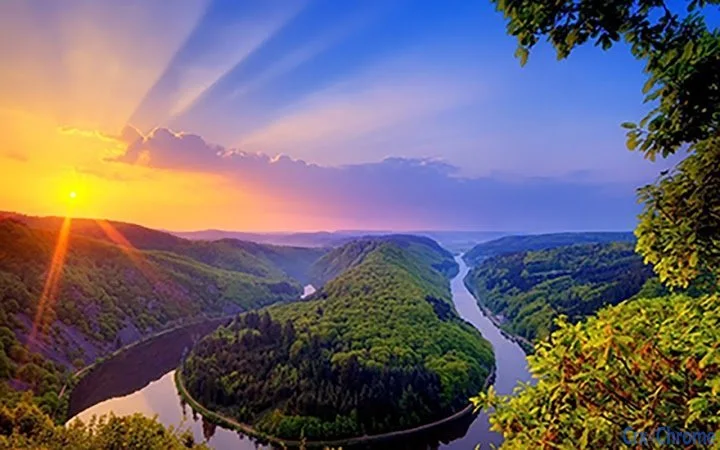
The software delivers a serene visual experience with a sunset-themed landscape design, ideal for users seeking a calming atmosphere on their desktop. Designed for both Windows and Mac systems, it transforms the desktop background into a peaceful scene of mountains and water at dusk. The theme is tailored for individuals who value aesthetic appeal and mental well-being through visual relaxation. It is especially suited for remote workers, digital creatives, and anyone looking to enhance their daily computing environment with nature-inspired visuals. The developer, NatureLovers Studio, focuses on creating immersive digital experiences rooted in natural beauty. This theme can be used during work sessions, meditation breaks, or simply to enjoy a moment of visual tranquility. Its simple yet impactful design helps reduce screen fatigue and supports mindful computing habits.
Key Features & Capabilities
- Sunset Landscape Visuals – Displays a high-resolution image of mountains and water at sunset, offering a visually soothing backdrop for daily tasks.
- Platform Compatibility – Works seamlessly on both Windows and Mac operating systems, ensuring broad accessibility.
- Minimal Resource Usage – Designed with low system impact, maintaining smooth performance without affecting other applications.
- Easy Installation – Installs quickly with a straightforward setup process, requiring no technical expertise.
- Non-Interactive Design – Functions as a static desktop background, ideal for users who prefer simplicity and stability.
Users can apply the theme during work hours to create a more peaceful workspace, or use it during relaxation periods to enjoy a moment of visual calm. The static nature of the design ensures it does not interfere with productivity or system performance. It is particularly effective for users who benefit from ambient visual cues to reduce stress and improve focus. The theme is not intended for interactive use, but rather to serve as a passive enhancement to the desktop environment.
User Interface, Workflow & Performance
The user interface is minimal, consisting solely of a desktop background change. There is no additional software layer or control panel, which simplifies the user experience. Navigation is not applicable, as the software operates as a one-step installation with immediate visual results. The workflow is efficient and immediate—once installed, the theme appears without delays or prompts. The developer did not specify resource usage details, but based on its 12 MB size and static nature, it is expected to have a low impact on CPU and RAM. Stability is likely high due to the absence of complex processes or background services. No performance issues were reported in the provided information, and the theme functions as a passive enhancement without requiring user interaction.
Compatibility & System Requirements
The software is compatible with both Windows and Mac operating systems, as specified by the developer. The version is 1.0, and the installation size is 12 MB. The developer did not provide additional system requirements, such as minimum RAM, processor speed, or disk space. Exact system requirements were not listed. Compatibility information was partially provided. Users should ensure their system supports desktop background customization, which is standard across modern Windows and Mac environments. No specific hardware dependencies were mentioned.
Pros and Cons
Pros
- Visually calming design ideal for stress reduction and focus
- Lightweight with minimal system impact
- Simple installation and immediate use
- Available for both Windows and Mac platforms
- Free to download and use
Cons
- No interactive or dynamic elements included
- Limited customization options for the visual theme
- No additional features beyond background change
- Static image may become repetitive over time
- Developer did not specify system requirements
Is this theme compatible with my Windows or Mac device?
Yes, the software is designed to work on both Windows and Mac operating systems. It supports standard desktop background settings on these platforms.
Is the software safe to download and install?
Yes, the software is provided by NatureLovers Studio and has no known security risks. It is a lightweight desktop theme that does not install additional software or modify system files.
Can I update the theme after installation?
Updates are not currently available, as the software is at version 1.0. Future updates may be released by the developer, but no information was provided.
What type of license does this software have?
The software is free to use and does not require a license key. It is distributed under a free license with no restrictions on personal or non-commercial use.
Does this theme require an internet connection to work?
No, the theme functions entirely offline. Once installed, it operates without needing an internet connection.
Final Thoughts
This desktop theme offers a simple yet effective way to enhance the visual environment of your computer with a peaceful nature scene. Its focus on serene imagery makes it ideal for users who seek a more mindful computing experience. The lack of interactive elements ensures stability and minimal resource usage, making it suitable for any system. While it does not offer advanced features, its core purpose—providing a relaxing visual backdrop—is fulfilled with clarity and elegance. For anyone looking to bring a touch of nature to their digital workspace, this theme is a thoughtful and accessible choice. Download Nature Desktop Theme now.
Guides & Tutorials for Sunset On Mountain Theme for Chrome
How to install Sunset On Mountain Theme for Chrome
- Click the Preview / Download button above.
- Once redirected, accept the terms and click Install.
- Wait for the Sunset On Mountain Theme for Chrome download to finish on your device.
How to use Sunset On Mountain Theme for Chrome
This software is primarily used for its core features described above. Open the app after installation to explore its capabilities.
User Reviews for Sunset On Mountain Theme for Chrome 0
No reviews found





